Showing posts with label Tip. Show all posts

Sunday, 21 October 2012

How To: Physical Security

Hi, this week I'm going to be telling you how to secure your computer from those unwanted guests. This is a series of tutorials but the first issue we will be addressing is protection against someone who has physical access to your computer. These methods protect your computer not your files so if someone removed your hard drive they could open your files. In next week's tutorial we will prevent this.

Disclaimer
I am not responsible for any damage you cause whilst following this tutorial. Nor am I responsible for any actions you may take before, during or after reading this. In other words don't blame me, this tutorial is for educational purposes only.


Most of us only want to keep family out of your computer and often a strong password will keep the primitives at bay. But how do you know if your password is strong? It should:
  • Have a Mixture of lower case and upper case letters.
  • Contain one or more numbers in them
  • Not consist of a word from any dictionary
  • If possible contain punctuation.
  • Not be easily guessed such as a pets name.

An example of a strong password is, for the chemistry geeks: P3riod1C.Table and just for the record this isn’t my password I only came up with it because I have a periodic table on my wall and using the online password checker howsecureismypassword.net you can see that it would take an average computer 4 billion years to crack your password and what sibling can ever be bothered to wait that long?

So that will keep out some of your family, but what about those whom are more technically able? A simple password isn’t going to keep them out. Why? Think about it: when you send your PC off for repair how do the technicians gain access to your computer?

You see what Microsoft fails to tell their customers is that they decided they want a backdoor in their system. This back door just happens to be in the form of a secret, hidden Administrator account. What’s worse is the security on this account; non-existent. That’s right folks, right now on your Windows computer there is a massive gaping hole in your perfect password.

Don’t believe me? I’ll prove it: on your computer goto Start > All Programs > Accessories > Command Prompt or type cmd.exe in your start menu. This will open a black window which makes you look very hackeresque. Type in ‘net user’ into this window, without the quotes of course, and this will list all the accounts on your computer and as you can see Administrator is there.

I have blanked out the computer name for security reasons

However we can quickly fix this. You have two choices you can deactivate the account which I prefer because I can always access the data should I ever need to or you can delete it however this is permanent. You will, however, need your own administrator privileges (normally the person who had access to the laptop first or install software) to make these security changes.

Re-open command prompt but this time right click on the icon and click Run As Administrator. Read the message box and click allow (or the equivalent)

To Deactivate (Recommended)
In Command Prompt type in ‘net user Administrator’ this lists all the details of the account including the last logon which can be useful. Now we are going to disable the account type:
 net user Administrator /active:no
You will receive a command saying that the command completed successfully. If you wish to reactivate the account just substitute no for yes.

To Delete
This is simple, yet I don’t think it is anymore secure but should you wish to purge this account simply type
 net user Administrator /delete
You will receive a command saying that the command completed successfully. This account will no longer be listed if you type in net user.

But for those who, like myself, are truly paranoid there is one more layer of security: a BIOS password. The Basic Input Output System is a layer of computer software which we will not go into detail over however it is separate to the OS and therefore it is harder to hack (however not that hard if you know how). Again this password protects your computer not the files stored on the hard drive.

Now this is the difficult part because it varies between different computers and you have to hit the button at the right time. When you turn on your computer you will be presented with your computer manufacturer logo. At this point read the instructions at the bottom of the screen. The option you want will say something like press [F2] to enter BIOS.

Now it doesn’t take a computer science degree to realise that you need to press F2. This will bring you to another ‘hackeresque’ screen, normally blue, you should note that your mouse will not work here. Navigate using the arrow keys to the Security tab. Now navigate to the ‘Set Supervisor Password’ and press enter. Now enter your password which is normally a maximum of 8 characters remembering our guidelines from earlier on.  One last thing is to ensure that Password Check is set to Always this will mean you have to enter your BIOS password every time you logon.

This approach is not practical, however, should you need to share the computer. Make sure you Save and Exit.

If you get stuck or run into any problems just leave a comment below and I'll get back to you.

And that's it, your computer is protected against your family.

Until next time,
Kris

PS: I have created some cool graphics for A New Perspectives. You can get our desktop background below by clicking on it. Don't just right click and save because you won't have the right resolution.


Sunday, 9 September 2012

Dots

From close up the painting just looks like a random collection of dots - like the blurred lights of a city. But take a step back and suddenly everything makes sense, all those random dots form a perfect picture. I never understand drawing with dots but now? Now I think I do - either that or I am being far too philosophical but hey isn't that what life is about? Finding meaning when there is none.


Do you remember those dot by dot books we had when we were younger? The ones you had to link up following the numbers and you could never guess what it was until you were near the end - maybe that's what life is; a dot by dot but without the numbers.

How are we supposed to see the point we are too close to the page. Sometimes, we just need to take a step back and appreciate the beauty. And one day when we are old and grey and we've linked all the dots then maybe... just maybe we will have answered the question that we, the human race, ask all the way through our lives: what's the point?


It's just a short post today but I had a revelation. I thought it only right to share it with you; you know it will have been a year on Thursday since I wrote that first post Butterflies. It feels like a life time though it was just a year and yet I've changed I can remember writing it: where I was sitting, what I was feeling and I don't regret a second of our time together.

Yours looking back,
Kris
PS: Don't you dare stop reading. I love you all!

Sunday, 1 July 2012

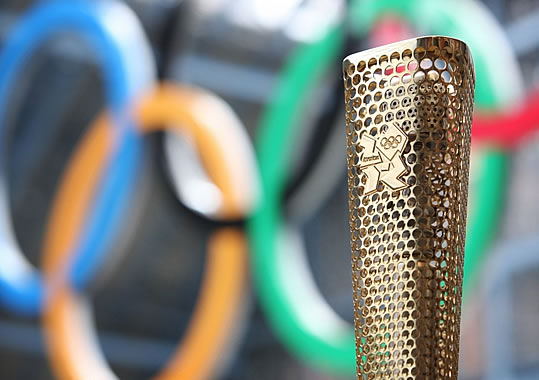
Olympic Torch

A pointless event; that was the view of a some and I suppose it is just another flame, I can do it with a match. What makes it so special? Is it that the flame comes from Mount Olympus?

I, however, have a different theory. The torch is special because its about being part of something; the olympics started in Greece 8000BC before restarting in 1894 and for every person standing in the pouring rain to see a flame travel past you know you've just become a part of history.

Quite proud of this photo I had to contend with giants to take it!


Through all the rubbish in the world, the crisis in the Euro zone, global warming, wars and yet millions of people are turning out to see a torch? No, they're coming in millions to see hope. You will be able to see that you saw the torch in person, but one thing did annoy me with the ceremony the carriers were supposed to be inspiration people and I know inspiration people but some of the people just aren't. 

Then afterwards it was the Carnival, now if you don't know this year I'm in the school show and for some unknown reason they managed to get us a float at the carnival and lets just say I know why the Queen doesn't ever wave properly. After two house of waving my hand was about to drop off! It was still amazing with everyone on the float even if we were about to have a breakdown from singing 'We Go Together'!

But just because you didn't carry the torch don't feel like you've never done anything important because what's the point of running with a torch if no one's there?

I'm on my work experience next week so I may not be able to get to a computer but I'll try and write in advance.

See you soon,
Kris


Also because we feel that not everyone deserved to be awarded was rewarded for their inspirational behaviour A New Perspectives will be running its own competition to find the most inspirational person in our school. So get your top three nominations in soon with a the reason why you think they should; you will remain anonymous if you wish.

Hurry up and give someone the credit they deserve. In order to nominate someone click here and thank you.


Sunday, 20 May 2012

Dating Tips

Yeah, I know you all want to learn how to become a pro at dating like me. Just in case you didn't notice that was sarcasm, I'm not a pro at dating I am not going to pretend to be.

But me not being in relationships has allowed me to notice things that other people might of missed, so this is Kris' Top 10 Tips for Guys and Gals. This is just supposed to be for fun I wouldn't listen to everything I say and certainly don't take offence at it.

For Girls
    1. Guys, even if they aren't, want to feel manly and when you know how to make them feel like  that they will love it.
    2. You may not know this since you aren't a guy but guys are just as self-conscious as girls, except they don't admit it. When you turn them down and they suddenly start to insult you to their friends its actually self-preservation kicking in; they don't want to find a fault in themselves so they find it in you.

    3. Girls, do you know how angry/sad you get when your guy looks at another girl they feel exactly the same way when you look at another guy. So don't do it.

    4. You can't expect your boyfriend to stop hanging around with his friends because guess what they're his friends. That also includes a girl who he's friends with because even though a guy has a friend who's a girl that doesn't mean they are sneaking around behind your back because for all you know she might be the one who helps get on with you.

    5. If you don't want a boyfriend who's a 'player', it's quite simple don't date one.
For Guys
    1. I know for some of you this may be hard to believe, but a girl doesn't belong in a kitchen and she will get angry if you think so.

    2. When a girl says you don't have to get me anything (for her birthday or Christmas ect.) what she is really saying is that I want you to get me something but not because you have to but because you want to.

    3. Again another shocker, staring isn't as bad as touching another girl (lets say her name is Girl B) but it hurts the same because the girl (Girl A) will instantly compare herself to the girl (Girl B) you were staring at. She will spend forever trying to figure out what she (Girl B) has that she (Girl A) doesn't.

    4. Your girlfriend is still going to be the same girl as she was before; don't expect her to stop doing what she enjoys, if she liked shopping she still will, if she liked football she still will - don't expect her to change and don't try and make her.

    5. Don't insult her - you'd think this would be obvious and yet you still hear some people saying that their girlfriend is too fat or any other rubbish you think of. May I just say that also mean's that girls shouldn't say the things to her boyfriend.
So that concludes Kris' Top Tips, don't leave it to late to say something to the person you like,

Kris